When you click on links to various merchants on this site and make a purchase, this can result in this site earning a commission. Affiliate programs and affiliations include, but are not limited to, the eBay Partner Network.
Thank you!
If you do not wish to have your item(s) delivered on data disc(s), I can provide them on a flash drive and other means as well. Just let me know if a disc does not work for you and we can discuss delivery by other methods.
COMBINING SHIPPING COSTS
Are you purchasing multiple items? I will: a) combine all invoices before payment and charge shipping equivalent to one item, or b) refund all shipping costs in excess of one item after payment.
All derivative (i.e. change in media; by compilation) work from this underlying U.S. Government public domain/public release data is COPYRIGHT © GOVPUBS
$3.00 first class shipping in U.S.
Includes the Adobe Acrobat Reader for reading and printing publications.
Numerous illustrations and matrices.
Contains the following key public domain (not copyrighted) U.S. Government publication(s) on one CD-ROM in both Microsoft PowerPoint and Adobe Acrobat PDF file formats:
TITLE:
Calibrate Multimeter, 69 pages (slides)
SLIDE TOPICS, SUBTOPICS and CONTENTS:
Calibrate Multimeter
Terminal Learning Objective
Introduction
Evaluation
This lesson will be evaluated with a hardware performance examination at the conclusion of this block of instruction.
The student will calibrate all parameters of the multimeter IAW the applicable TBs.
Enabling Learning Objective A
Learning Step One
Analyze specifications with tolerances of various parameters as the Test Instrument (TI) is being calibrated. Using calibration Procedure TB9-6625-2147-24, identify components and analyze capabilities of the Simpson Model 260-8 Multimeter.
◦ Preliminary Instructions
◦ Equipment Setup
◦ DC Volts
◦ AC Volts
◦ Resistance
◦ DC Current
◦ Final Procedure
260-8 Front Panel
• Indicator
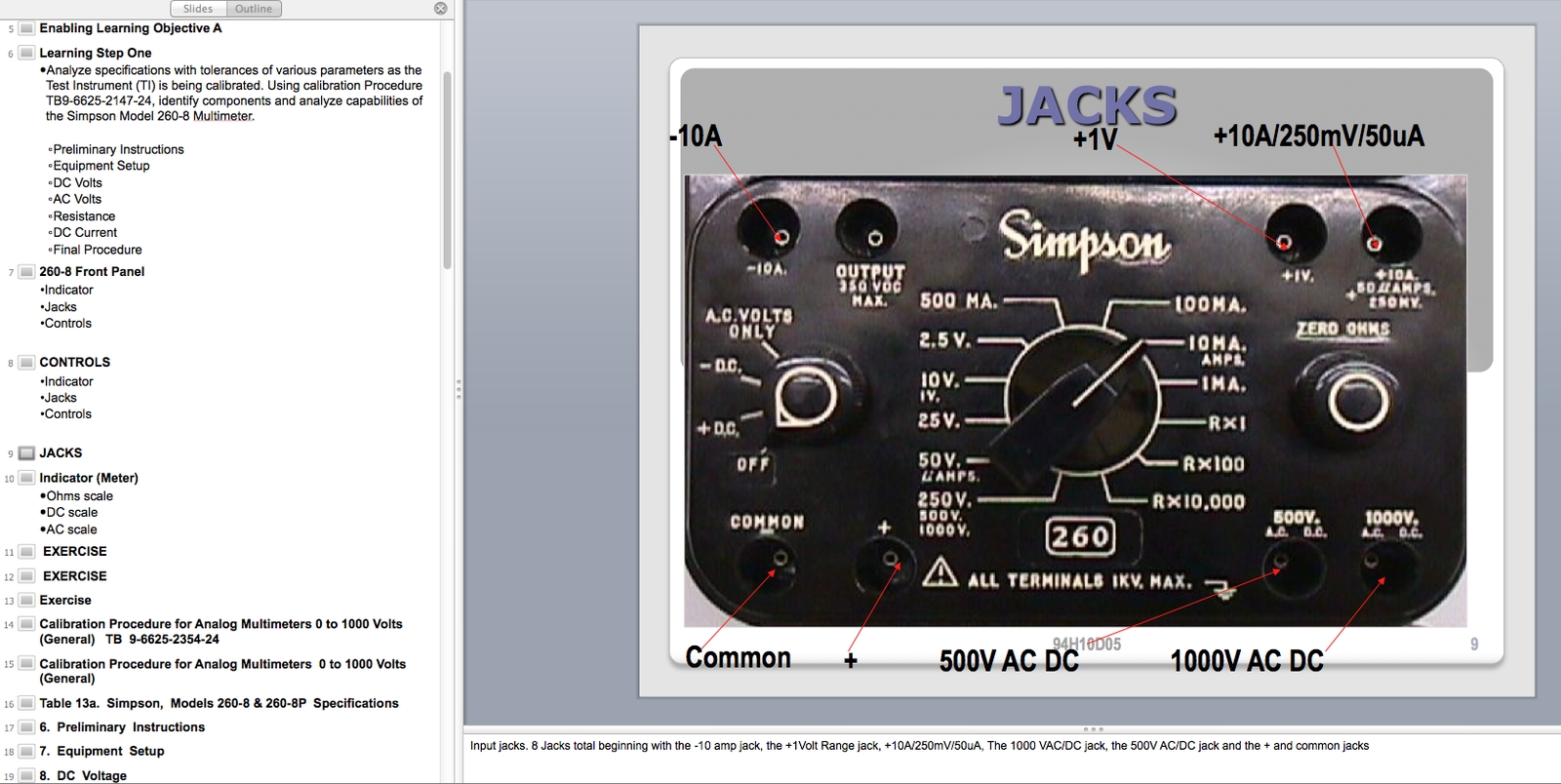
• Jacks
• Controls
CONTROLS
• Indicator
• Jacks
• Controls
JACKS
Indicator (Meter)
Ohms scale
DC scale
AC scale
EXERCISE
EXERCISE
Exercise
Calibration Procedure for Analog Multimeters 0 to 1000 Volts (General) TB 9-6625-2354-24
Calibration Procedure for Analog Multimeters 0 to 1000 Volts (General)
Table 13a. Simpson, Models 260-8 & 260-8P Specifications
6. Preliminary Instructions
7. Equipment Setup
8. DC Voltage
Table 13b. Simpson, Models 260-8 & 260-8P DC Voltage
9. AC Voltage
Table 13c. Simpson, Models 260-8 & 260-8P AC Voltage
10. Resistance
10. Resistance (Con’t)
Table 13d. Simpson, Models 260-8 & 260-8P Resistance
11. DC Current
Table 13e. Simpson, Models 260-8 & 260-8P DC Current
12. Final Procedure
Learning Step Two
Enabling Learning Objective B
Learning Step One
Using calibration procedure TB 9-6625-2189-35, identify components and analyze specifications and capabilities of the 8840A/AF digital multimeter.
Preliminary Instructions
Equipment Setup
DC Measurement
AC Measurement
Resistance Measurement
DC Current
AC Current
DC Ratio
Software Adjustments
Final Procedure
6. Preliminary Instructions
7. Equipment Setup
7. Equipment Setup (continued)
8. DC Volts
8. DC Volts (continued)
8. DC Volts (continued)
9. AC Volts
9. AC Volts (continued)
10. Resistance
10. Resistance (continued)
10. Resistance (continued)
11. DC Current
12. AC Current
13. DC Ratio
13. DC Ratio (continued)
14. Software Adjustments
Learning Step Two
Enabling Learning Objective C
Learning Step One
Identify and gather components, connect and configure all hardware, and locate and run appropriate ICE TB to calibrate an 8840/AF.
Core Settings:
(1) Hardware.
Connect all standards to GPIB0 and set their
addresses, accordingly:
a. HP 3458A Multimeter @ 12
b. JF 5720A/CT Calibrator @ 15.
(2) Connect all test instruments (TI) to GPIB1.
Notice: JF Boost 5725 replaces both older JF boosts, 5215 and 5220. System will lock if newer boost is energized while connected to a 5720 having an older boost active.
Close the Hardware Settings box and click on the Core button at the top of the CALSETS Workstations Menu.
Browse through the numerical ordered list of Electronic Technical Bulletins (ETB) until you find the one you need for the TI you are calibrating. In this case you are calibrating the AN/GSM-64D, so you are looking for ETB 60081-2.6 (AN/GSM-64D) MAIN IEEE CAL/VERIFY.
Click on ETB 60081-2.6 (AN/GSM-64D) MAIN IEEE CAL/VERIFY once. Then read and follow the instructions given in the dialog box.
After you have read and completed the instructions in the dialog box click on the CONTINUE (ADV) button
Learning Step Two
Summary